Showing posts with label Recommendations. Show all posts

Sunday, January 7, 2024

Reacher Season 2 - My Reaction So Far

Season 1 of Amazon's Reacher was a surprisingly entertaining show with a great cast that showed clear chemistry with each other.  The banter between the characters were fun to watch rather than annoying and the pacing at which each character's background is revealed kept me engaged through the entire season.   Unfortunately, season 2 has not had that same ingredients.

Most of the new characters already had a developed relationship so the character development happened mainly through flashbacks and the chemistry between them were lacking or lacked tension.  The pacing also feels more off this season there lacks any mystery to events and each episode felt a bit like the previous episodes.

Two more episode remains in this season and hopefully it picks up pacing and provide a satisfactory ending that will hold over until season 3.

Friday, January 5, 2024

Anime to Start the New Year - The Apothecary Diaries

For the first post of 2024, I'm starting with a positive review of The Apothecary Diaries.

Originally a Japanese light novel and then a manga before being released as an anime starting in October, 2023.  The Apothecary Diaries takes place in a fictional imperial China and follows a young Chinese girl who loves studying and making medicine.  With a pragmatic acceptance of realities of social norms of feudal China, the protagonist nevertheless ends up rising in prominence within the imperial court.

I enjoyed the characters and mysteries surrounding our heroine and the relationships she establishes with members across the social spectrum.

Unlike many modern anime, The Apothecary Diaries immediately secured not just a one season but two seasons of episodes (24) and as of this writing is half way through the initial 24 episode run.  I've been fully enjoying the anime and would recommend.


Sunday, January 2, 2022

Harry Potter Reunion Special

The end of 2021 and start of 2022 seemed be consumed with late 20th century nostalgia.  Over the past few months there was the live action version of Cowboy Bebop (better then I expected), the release of the fourth Matrix movie (okay as an nostalgia trip especially when streamed), season 4 of Cobra Kai (great actors and respect to the original but heavy on the soap-opera drama), another Sex In the City movie (not interested), Ghostbusters (very interested) and a bunch of reunion specials such as Fresh Prince of Bel Air and Harry Potter.  There are many others, but I can't really keep up with all the history!

Harry Potter did not play any defining part of my life so I didn't have much interest in its reunion special.  I did read the books and watched all the movies, but while it seemed to have been a major event for the Millennial generation I had viewed it as pop culture entertainment.  When I found myself folding laundry one night, I decided to switch it on just to have something running in the background and this is my quick reaction.

JK Rowling Controversy

The author's controversy around her views towards transgenders is well documented and the special did not address it directly.  The author was not part of the special although clips from previous interviews was used (and prominently noted on screen that they were from prior interviews) and it wasn't brought up anywhere during the special.  Although it wasn't addressed directly, I wonder if there was some subtle jabs taken in the selection of quotes used during the show especially one that says to not judge a person by their looks but by their actions.

While I didn't mind that the author was not part of the show, completely avoiding the controversy did not keep it from hanging awkwardly over the special.

Grown Up 

The main actors grew up in front of our eyes through the 8 films and to see them together again was a reminder of how time has passed.  At the end of the series, they were still young and just  embarking on adulthood but now they would be playing the parent/teacher roles if the movies were made now. 

Informative...not

I'm really not sure what the show was trying to do.  It gave tidbits of background and context and would not be considered to be any type of documentary.   There was emotions shown by the 3 leads as they got together, but no information was given about their interactions over the past 20 years.  Was this the first time they seen each other in a long time or did they hang out regularly? There were some hints of tension but they quickly jumped in to PR mode and declared everything was great! 

The cast were also separated into groups so there weren't a lot of interactions shown between different people.  Many people were not part of the special but played major roles and they weren't even mentioned.

Conclusion

The special felt like it was hastily put together so that it can be broadcast to start the new year.  I'm not certain if they actually had a reunion or whether it was just a bunch of different interviews sliced together.  It provided little for the casual Harry Potter fan and unlikely to provide any satisfaction to full Harry Potter fans.

Sunday, November 21, 2021

Thoughts on Shang-Chi and the Legend of the Ten Rings


Shang-Chi and the Legend of the Ten Rings got a lot of positive buzz so I watched it when it came out on Disney+.   As expected of a super hero movie in the MCU, it delivers its share of action and comedy.  It is notable that a movie centered around a hero of Asian decent with a story line that stays within an Asian sphere that it had a predominantly Asian cast.  The film aimed to respect the Chinese culture and avoided the use of outdated stereotypes.  Multiple articles have pointed out the cultural significance of this movie.

Shang-Chi will be most identifiable to Asian-Americans (or those of asian descent who grew up in western cultures) because the film is still looking at Asian culture through a Western perspective.  For example, although respectful in its view of the philosphy and people of a hidden village that is meant to represent traditional Chinese culture (even though technically the people are aliens), there are many manerisms that are clearly western (hugging as a greeting), but it is still reflective within the Asian-American experience so it's not something to criticize. 

While I enjoyed the movie for what it is, a superhero film, I also felt the movie was too rushed and wasn't able to imbue Shang-Chi with the inner qualities of a hero before the movie ended.  Instead, Shang-Chi is the superhero of the movie because he got super powers, used those powers and won a fight against the big baddie.

As a person, Shang-Chi never overcame blaming his father nor displayed the empathy and support that those around him showed him.  While angry at his father for making him train in the martial arts, the movie made it very clear that his father was not cruel and did raised him through fear as Thanos did with his own "children".  The movie also made made it clear that his father did made a concerted effort to atone for his past and that while that was recognized by Shang-Chi's mother, Shang-Chi does not attempt to consider it even though he is grown up and has had distance to reflect.  I'm not saying that the father is absolved of his wrong doings and he did fall back to his old ways, but this is a movie aboug Shang-Chi and not about his father.

Instead, Shang-Chi goes from saying how having to kill made him run away from his father to saying that he must kill his father in the same scene.  I found this lack of taking personal accountability and blaming others especially surprising as this difference is what was shown to separate  Captain America and the Patriot as shown in Falcon and the Winter Soldier.

Ultimately, this made me a little unsure about the character of Shang-Chi.  As a movie, I like the actors, the filmography, the respect it showed the Asian culture as well as the action and comedy that the MCU brings.  I do look forward to seeing more and hope that they will take more time in the next movie to develop the real "hero" aspects of Shang-Chi.

Tuesday, April 6, 2021

Listing installed packages on Fedora with DNF

To list the packages that are user installed:

dnf history userinstalled

To list all installed packages:

dnf list installed

Tuesday, August 4, 2020

Basic Gaming PC for Kids

After a summer full of "OMG, why is it lagging so much!!!" being shouted out at seven in the morning (compounded by how we're all been sheltered at home due to covid-19), I realized that to preserve my sanity that I must give in and build the kids new PCs.

As a PC for the kids, my specifications are quite different than a machine that my livelihood relies upon:
  1. It must be able to run their commonly played games (primarily games like Minecraft and Roblox) at good frame rates and speed.
  2. Relatively inexpensive.
  3. Allow future expansion (defer as much cost to the future as possible).
Less important are small form-factor and ultra-quiet although there is some consideration giving that we have to put it somewhere and don't want it so loud that they would complain about it later.  I don't intend to do any type of over-clocking (they have to figure that out themselves if they really want that but I don't expect that for awhile).  Fortunately, the kids aren't into RGB lighting and other stuff to make their rigs "cool looking" but who knows what will tickle their fancy in the future.

The final configuration was:
The Ryzen 3 3200G is a 4-core/4-threads 3.6GHz CPU with integrated Radeon Vega 8 (noted by the "G" in the name).  Since gaming aren't core-intensive types of applications there isn't a reason to aim for high core count.  The Ryzen's integrated graphics are powerful enough for my kids' gaming so I can avoid getting a discrete graphics card initially.  AMD's stock CPU cooler is also generally considered to be good quality so there isn't a need to buy another CPU cooler especially (as opposed to Intel CPUs where it's usually recommended to get another CPU cooler and not use what it comes with).  At $100 it was also relatively inexpensive.  With this CPU, I can defer spending money on a graphics card, CPU cooler and additional case fans since I don't expect it to really generate high heat.  

The $70 ASRock  B450M-HDV R4.0 micro-atx motherboard is a basic, modern and has a good reputation motherboard.  It might not have the most cutting edge (usb type-c) or advanced features (dual 10gbits LAN) but it has all the modern features that are commonly needed (DDR4, PCIe, SATA3, M.2, USB3.1, gigabit LAN, HDMI, integrated audio).  On the opposite end of modern it also has DVI-D and D-Sub (VGA) connectors.  The board does NOT have built-in WIFI or Bluetooth though, but neither are used by my kids on the PC.

For the case, I went with the ThermalTake S100, a mid-tower micro-atx case.  It wasn't the cheapest case at $70 but also not a $90-$300 case either.  It is a basic but quality-built case.  I also chose it because micro-atx board are more abundant and cheaper, it being a "bigger" case means more space for components inside for either expansion or air flow.  Basically, I figured I didn't have to fill it up with cooling at the beginning since I'm not even putting in a discrete graphics card or worry about top-notch cable management.

For the PSU, I got the EVGA 600BA which I guess just came out right as I was shopping so there was inventory.  It's $70 and since I didn't know much about power supplies I went with a reputable brand and this price seemed reasonable.

For storage, I felt a 250GB SSD is sufficient and at $45 it was inexpensive.  For Steam gaming, they kids already had a external hard drive that they store an less played games on and when moving between computers it is just easier to bring the external drive. 

For memory, I got 16GB which is overkill for a gaming PC of this type (seems like 8GB is the sweet spot) but it was a little bit of future proofing since if I got 2x4 GB memory that means that future expansion would require replacement rather then addition.  16GB was $70 so one can save ~ $35 when going just with 8GB.

I didn't have to spend additional money on Windows 10 since I transferred it from their old computer so the final cost of the build was:

CPU:    $ 100
MB:     $  70
Case:   $  70
PSU:    $  70
SSD:    $  45
Memory: $  70
--------------
Total:  $ 425

I'm sure the values will fluctuate, but I'm not someone who is keeping track of component pricing.  I shopped from what was available at the time I decided to buy.  I guess covid-19 has lead to increase in price of a lot of components although I think I avoided some of those (graphics card, popular gaming cases of YouTubers)

Monday, February 17, 2020

Dayfarer Backpack For Everyday Use (Long Term Review)


I no longer have to bring as many things to work with me and I started to bike to work on some days instead of driving.  Because of the former, I no longer needed needed the degree of organization that the eBags Professional Slim offered.  Because of the latter, I needed to bring a change of clothes (including shoes sometimes).  The Professional Slim is great with all of this organizational pockets and the especially its device garage, it didn't offer much room in its main cavity for bulky items such as clothes and shoes.

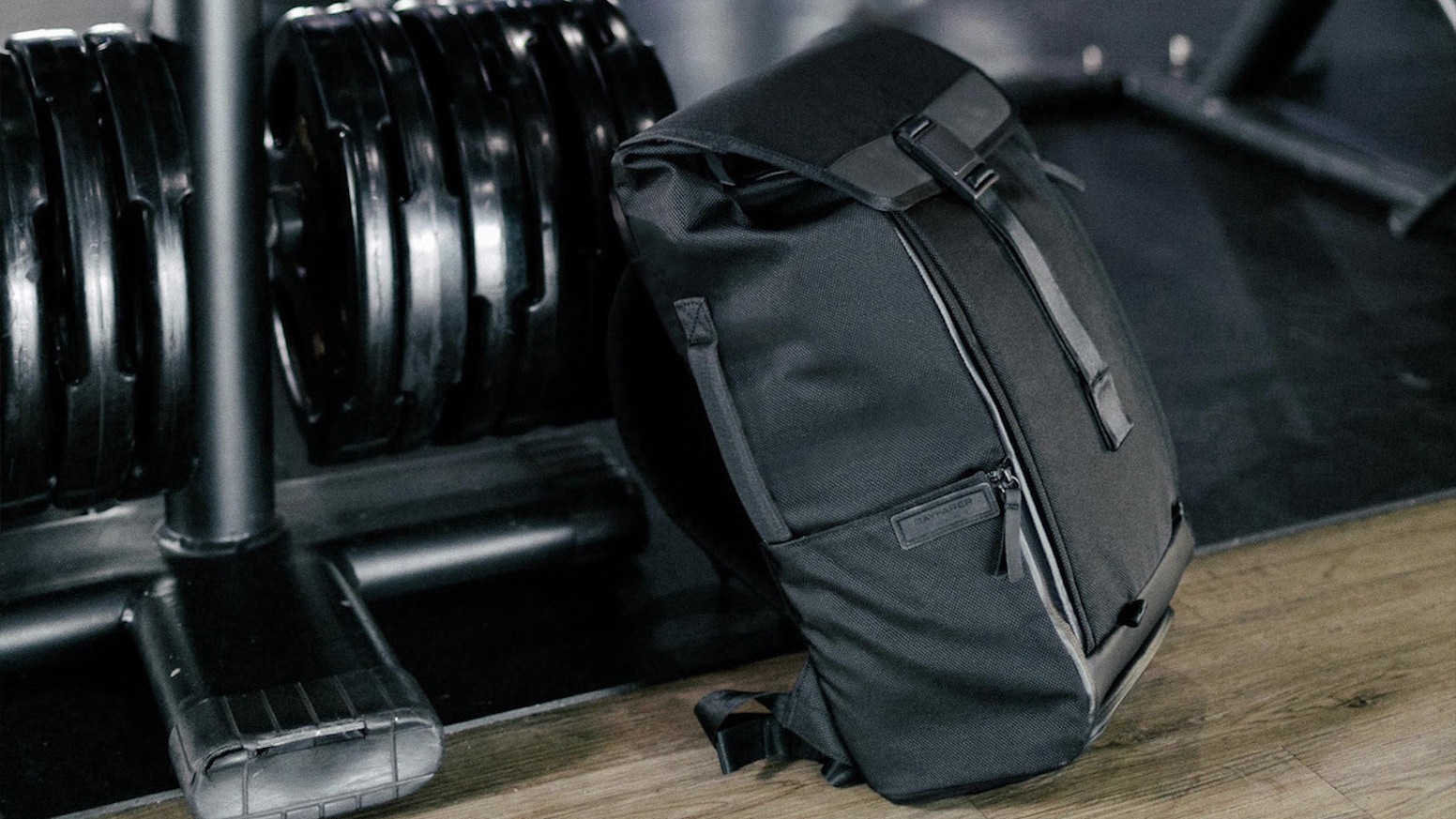
I started to look for a different backpack and I found the Dayfarer.  The Dayfarer is a minimalist everyday carry (EDC) backpack that is designed for gym and work with an emphasis on convenience.  I've been using it as my daily backpack for the past year.

A sleek and functional backpack for everyday use, which blurs the line between sport and work.

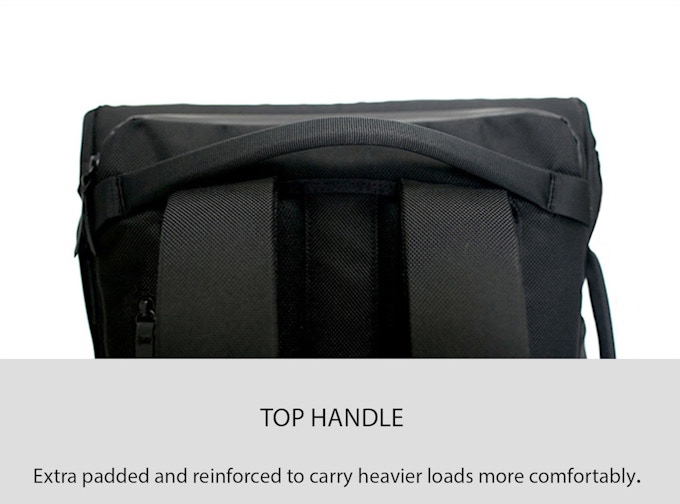
The Dayfarer offers minimal organization but a lot of convenience.  Whether it is the magnetic clip that can be operated with a single hand, shoulder strap pocket, easy-access side pockets, front-and-back hidden pockets, top and side handles, and luggage handle pass-through, each feature of the backpack is meant to be easy to use and/or access.  I really like backpacks with side handles because I find it easy to grab to put in-and-out of the car.  The sides pockets can be access without having to take off the backpack and the front pocket can be access without opening up the backpack.

The separate laptop pocket can also be accessed without opening up the main compartment.  Most of my most needed stuff are put into these pockets so I don't normally have to go into the main compartment.

When I do need access to the main compartment, the magnetic locking clip can be operated one-handed.  The kinda-of roll-top style turns out to make the backpack very flexible and easily expandable when more space is needed but more compact when it does't need to.  The backpack can also open flat to let you see and access the entire contents at once.  Most of the time, I don't open it up flat and just access it through the top.  I didn't find Dayfarer's info to really show this but reviewer Chase Reeves shows it on his video review.


There's not much organization on the inside besides two pockets so it is basically a large bag to put things in.  When I do need to bring a bunch of small items, I use my Peak Design Tech Pouch and just put the entire pouch into the main cavity.

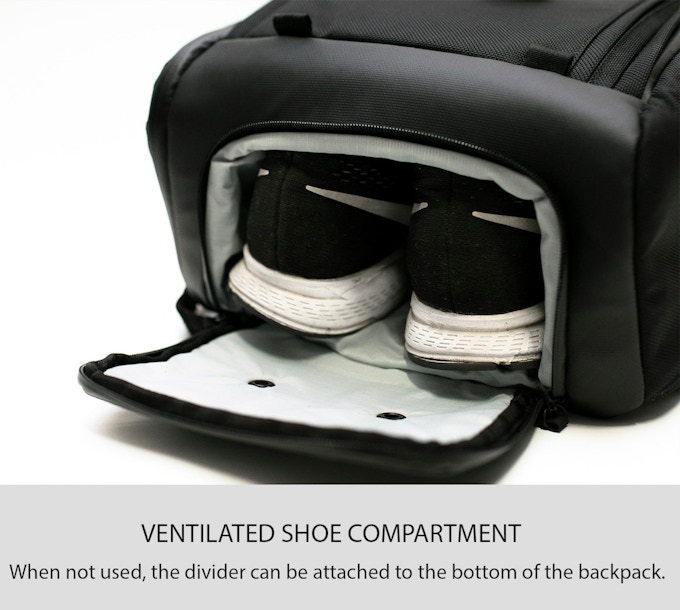
The bag has a ventilated shoe compartment with a waterproof separation from the make compartment so it can be used to carry shoes or whatever items (e.g. dirty clothes) you you don't want to get mixed
in with your other stuff.


This bag offers a lot of flexibility in how and what it carries.  I've mentioned how it's roll-top like design makes it very expandable but for those who need more space, the backpack has loops on the bottom so you can hook things like your tripod or yoga mat to it rather then put them into the bag.

The Dayfarer is not very heavy at 2.5lbs.  The materials are high quality (waterproof balistic nylon, water resistent YKK zippers, etc.) and it is well constructed.  This is not a fancy backpack but a well designed one.  The pricing is reasonable although be aware that this is shipped from Germany and will take time.  My order was shipped within a few days but once it reached DHL there was no updates for nearly 2 months before it arrived.

The only thing I wish it was better on is for the top handle to be connected to the main body rather then the back.

The reason being that if you forgot to zip up the laptop compartment then when you use the handle it is pulling from the compartment's back.

After a year of use, the backpack has held up well and doesn't show any wear-and-tear except for some scuff mark on the buckle.  I really like this backpack and I've used both as a daily work bag but also when going out on the weekend when I think I might need to carry something.

Sunday, February 16, 2020

Modern Day HP Voyager Calculators by Swiss Micros

There are two particular electronics devices that even decades later are still used and considered superior to any modern competitors: the IBM Model M keyboard and the HP Voyager line of calculators.  Fans of these devices loving hold on to these devices even after decades of active use and will only give them up if it's pried from their cold dead hands.  While nostalgia does play a role in generating love for "retro" devices (as we see with the release of retro style gaming console), what sets the IBM Model M keyboards and HP Voyager calculator is that these devices are just really good at what they do and their style and design are no longer being manufactured (well, at least no longer mass produced by the original manufacturer).

Do a search on Google and Youtube you'll easily find fan sites that will explain in glorious details what makes these devices so special.  I have an HP 15C and it is as great as what people say it is.  From build quality, legendary battery life (we're talking about the battery lasting years/decades, folks) to the "feel" of the keys as you type, this is a phenomenal calculator that I've come to appreciate a lot more now then when I first started to use it.

The HP Voyager calculators are more niche then the the IBM keyboards.  People still regularly use a keyboard while the use of a dedicated calculators are now mostly limited to academic and research settings.  Even when these devices were sold by HP, it wasn't sold at the scale which IBM's keyboard were sold at, but once you've convinced yourself on how awesome these calculators are the question is how to get one many hasn't been sold or made in decades.

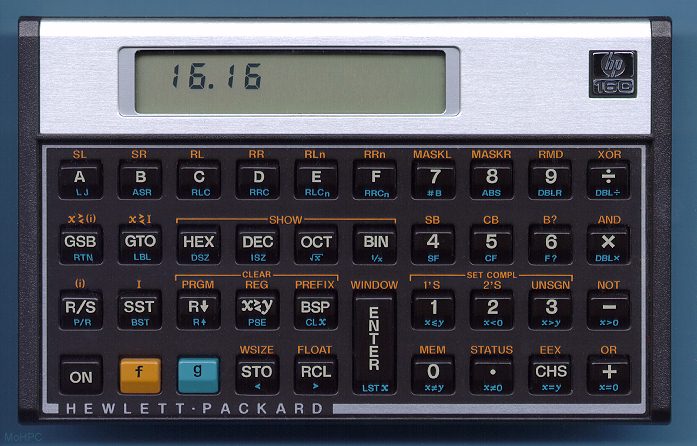
However, I'm a software engineering by trade and it was not until after I started working (and long after its production run in 1989) that I discovered that HP had made a version for computer programmers:  the HP-16C.  Once I did find out about its existence, I dreamed about owning one, but the HP-16C is even rarer to find then the 15C and as much as I might desire one I'm not going to pay whatever the asking price is when it does make a rare appearance on the auction market.


Then one day, I came across a company called Swiss Micros that was started by Michael Steinmann.  Apparently, Mr. Steinmann set out to clone the HP Voyager series and started to do so in 2011 with "mini" replicas that are about credit card size.  While these are cute, I wasn't too interested, but then Swiss Micros began to make full size replicas and that caught my attention.  Now I had a chance to experience a 16C directly so I ordered the Swiss Micros DM16L.


From its website, it's obvious that this is a small operation and it's selling a niche device, but the device shipped quickly.  It took awhile for it to actually reached me, but it arrived well packaged.  It doesn't use any fancy marketing box that modern devices tend to come in, but that's better for the environment!

My first impression was "wow, this thing feels solid".  These is a high quality RPN calculator for professionals.  I immediately tried out the keys and it had a very pleasurable tactile feel to them.  On its own merits, it is a top tier calculator, but people are likely buying this because they want an "new" HP Voyager.  I feeling that it does capture the spirit of the Voyager but this isn't an exact clone (and not just the logo and name).

The feel of the keys aren't the same which is noticeable when used side-by-side, but if you haven't touched an original in years then my guess is that you'll find just as much satisfaction with the DM16.  The lettering on the key caps are printed on the keys rather then injected into the key itself.

The overall dimensions are nearly identical but the LCD screen is bigger, the fonts are larger and there are multiple fonts to chose from on the DM.  I find the Voyager font to be cleaner and easier to read but font style is subjective.

The DM manufacturing is not as polished (both figuratively and literally).  The titanium casing around the LCD display showed the machining line and felt rough and not polished like the Voyager.  I'm not sure if it is intentional to show the grain of the metal (which is more yellow than the silver on the Voyager) but I suspect it isn't.  The rest of the case is well manufactured and everything is put together solidly.

If you noticed that the LCD has some spots/specs stuck in it even when turned off you can put the calculator in direct sunlight for a few days and they will disappear (easier and faster then to send it back to Swiss Micro and getting an replacement).

Would I recommend the Swiss Micro calculators?  As a quality RPN calculator, the answer is "Yes", but for most people it might be an overkill and pricey.  These aren't the calculator you want to just pick up and throw into the kitchen utility drawer.  For fans of the HP Voyager, fans of RPN calculators, and professional looking for a dedicated calculators then this is a solid piece of equipment to add to your toolkit.

Saturday, August 17, 2019

Asus CT100 Chrome OS Tablet

Although Google is indicating that they are getting out of the tablet market and the Pixel Slate is their last tablet, it doesn't mean the ChromeOS tablet is dead.  Company like HP, Acer and ASUS continue to work on using ChromeOS for tablets.  HP's approach is still directed more towards a 2-in-1 laptop/tablet experience while Acer is targeting the education market (but it seems like it falls short on performance).  

Of all of these, ASUS' CT100 tablet has gotten me the most excited!


ASUS is also targeting the CT100 towards education but it is perfectly suited for anyone looking for a quality 10" tablet.  Instead of an premium metal body of the Google Pixel Slate and HP Chromebook x2, the CT100 has a more rugged texture body with rubber borders to offer better protection.  It makes sense since it is targeted towards school and kids, but for those who usually put a case on their tablet for protection (and thus covering up the premium finish) this would actually save you from having to do that.

The weight and balance is good for one hand use and although it feels thicker then the Slate since it doesn't need its own case in the end it might actually be thinner.

The screen is great and is both sharp and bright.  It comes with a stylus including a place to hold it.  It's capable of running web apps (ChromeOS gives you a full fledged Chrome browser), Linux and Android apps (it seems to run Android apps better then my Pixel Slate).

The performance of the tablet is very good both for web browsing and Android apps.

The price is $330 is very good for a tablet of this quality.  Unless you need a 12" screen or 2-in-1, I would say that this is the tablet to get!


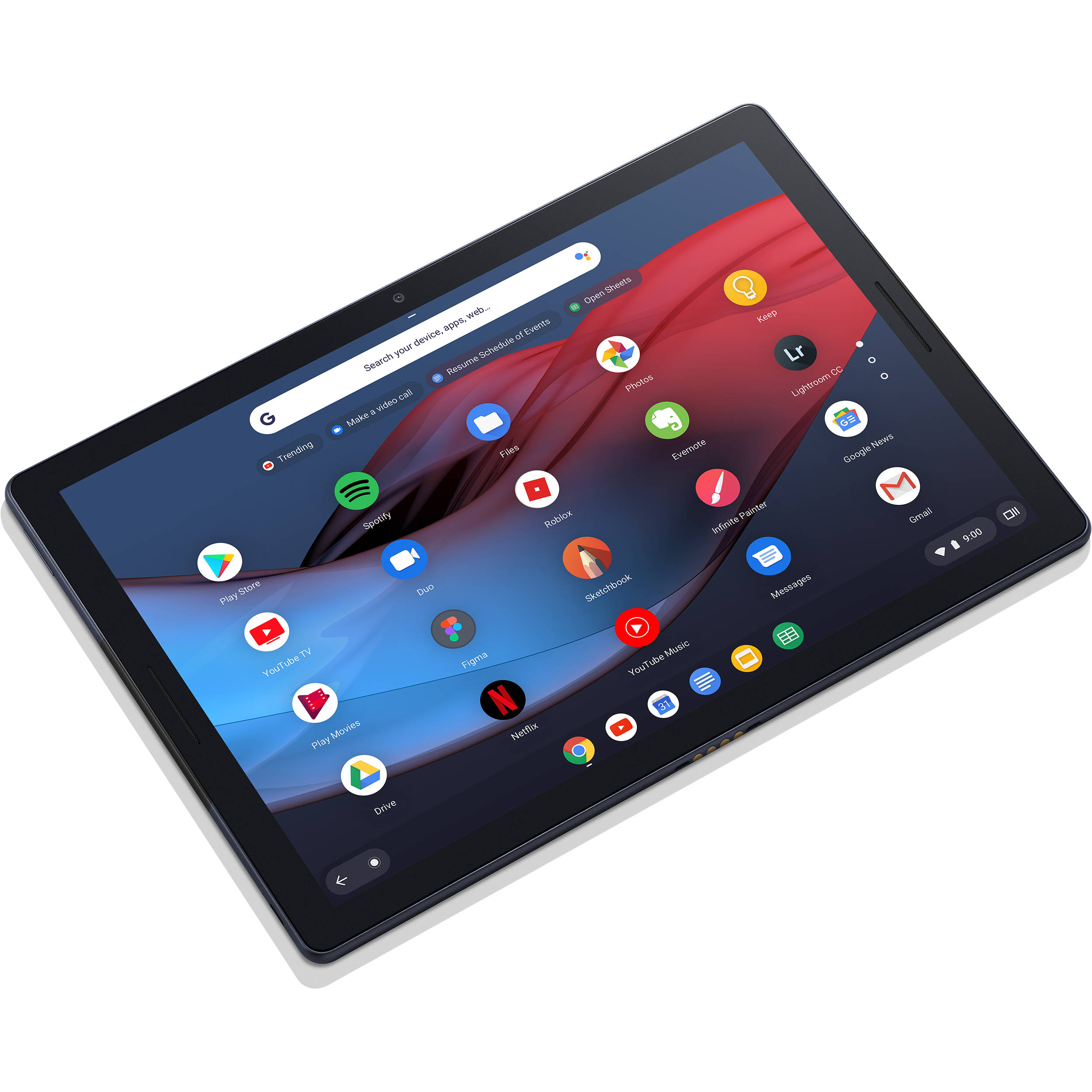
Google Pixel Slate - Mobile Workstation

I found myself needed a new tablet when my Pixel C tablet died.  The Pixel C was a very nice Android tablet and I've gotten used to that form factor (10").  I mainly use a tablet at home and primarily for consuming content such as reading and watching videos as well as handling some home automation controls.  For Android, I prefer the stock Android experience which I'm most comfortable with, but with Google having stopped making Android tablets (including the Pixel C) there aren't many options out there so I decided to give the Google Pixel Slate a try.

Image result for pixel slate

Pixel Slate & ChromeOS


Despite sharing the "Pixel" name the Pixel Slate is a ChromeOS device and Google's first (and only?) ChromeOS tablet.  I'm a big fan of ChromeOS but have only used it as a laptop.  Even when I'm using the Pixelbook, which can flip to be used in tablet form, I've only used it as a laptop since I find  it too bulky to use as a tablet.  The Slate doesn't come in a 10" form factor (ASUS has released a 10" ChromeOS tablet that has been excellent) and is only available with a 12" screen.  While the Slate can be viewed as a Pixelbook without a keyboard, that doesn't do it justice since it feels a lot more comfortable when held then a keyboard-less Pixelbook.  Still, I was somewhat hesitant to use a 12" tablet, but there are additional advantages with the Slate that ultimately led me to get it: Android support, Linux support and laptop mode.

When a keyboard is attached, it behaves just like a ChromeOS laptop.  This is essentially a 2-in-1 device which is useful when traveling since I don't need to bring a tablet and a laptop with me.

ChromeOS also don't get re-skinned like the Android launcher by OEMs so the experience is the same across all devices across all manufacturer.

Android Apps


ChromeOS now supports running Android apps so I can still access my Android apps although I prefer to use the web version since I now have a full Chrome browser.  In tablet mode, though, some apps are much more intuitive to use the Android version.  It's pretty clear that many web applications assume the user is using a desktop machine rather then one that uses touch as it's main interaction mode.   These are the times when the Slate will give the impression that ChromeOS is not very polished when compared to Android but in general it seems to be more on the app developer then the OS.

I have noticed that sometimes Android apps tries to start and either takes a while to come up or run into an issue.  I usually restart the tablet in these situation and the issue is fine.

Linux


ChromeOS is now capable of running Linux so I can do all my software engineering work without having to switch to developer mode. 

This a big deal for me as this allows me to just bring the Slate instead of a tablet and a laptop pair.

Accessories


I mainly will use laptop mode when I'm traveling.  While the on-screen keyboard works fine when I'm  using the Slate at home as a tablet, when doing a lot of typing it is still easier to have a physical keyboard.  I bought the Brydge C Bluetooth keyboard.  This keyboard can also be connected directly to the Slate and used in wired mode.

Brydge C-Type

For a mice, I use the Microsoft Surface mouse and I have a Pixel Pen.

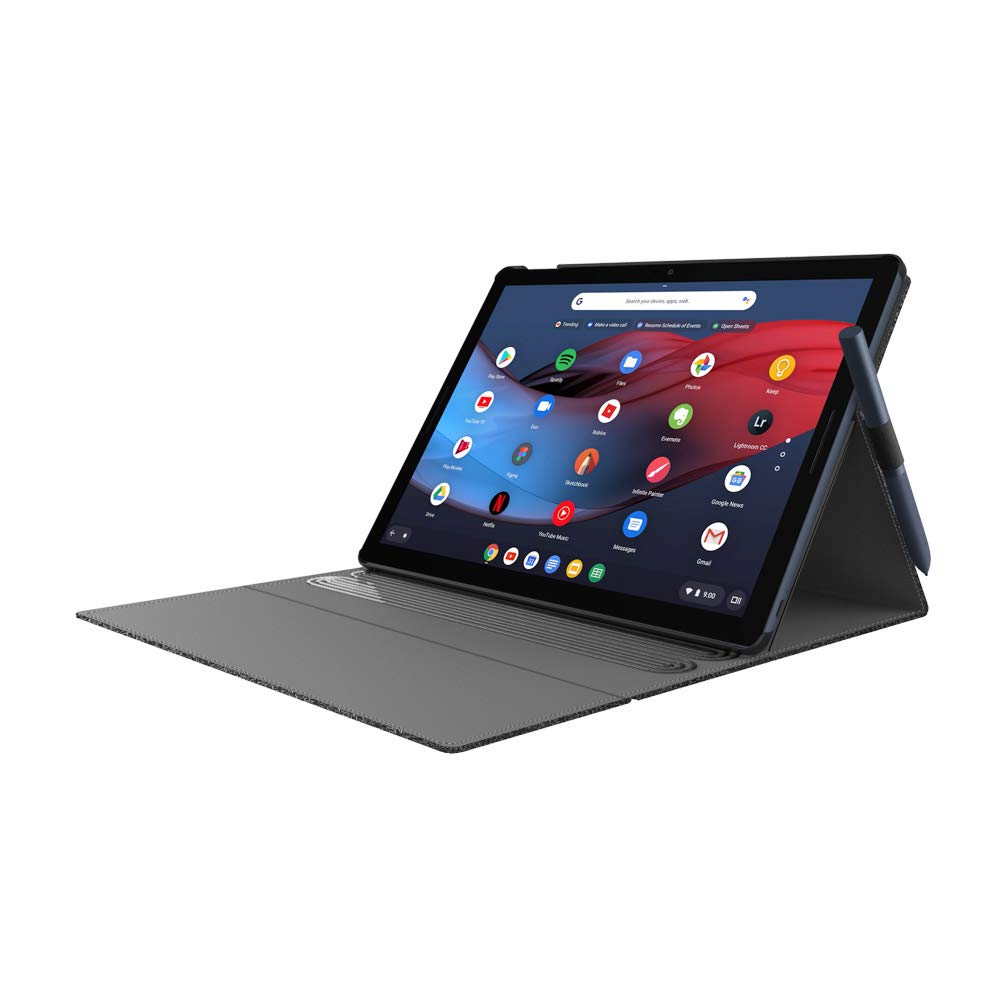
At home, I use a hand strap to make holding the tablet with one hand a little more secure and when traveling I use an Incipio Carnaby Google Pixel Slate Folio  case for a little bit of protection, to stand up the Slate and can hold the pen.

Performance


The knock against the Pixel has been (1) performance and (2) sometimes it doesn't feel very "tablet" like.  The latter is primarily because the web apps often are built assuming you're using a mouse+keyboard and android apps often are designed for such a big screen.  I personally found it to be fairly minor but if you use Android apps exclusively then sticking with a Android tablet might be better.

For the former, most of the negative stems from the low end Pixel Slate that were too under powered.  I have the i5 model and the performance has been fine.  The only time where I felt the Slate is slow is when powering on.   It takes a few seconds after hitting the power button before seeing the Google logo appear (this is when the Slate is completely turned off).  Recovering from Sleep is fast and the screen can be unlock with your finger print.

Conclusion


The Pixel Slate is a great dual purpose device.  When used as a tablet it works pretty well but starting Android apps don't feel as fast.  When used as a Chrome laptop, add the keyboard, mouse and folio case and it will be a very serviceable laptop especially for traveling or as a secondary computer (and primary tablet).

Sunday, April 28, 2019

eBags Professional Slim Long Term Review

I've been using the eBags Professional Slim as my every day carry (EDC) backpack for about a year and a half.  It is a well thought-out, high-quality and great value backpack that is great for techies and urban professionals.  I've not had any problems with it the 1.5 years that I've been using it for work and I would recommend it to others.  However, I am planning to change to another backpack soon for reasons not related to the backpack itself.


Nomatic Travel Pack Long Term Review

I've now had the chance to use my Nomatic Travel Pack (not to be confused with the Nomatic Travel Bag or Nomatic Backpack) on multiple trips (both domestic and international) so here is my long term review of this backpack.

Saturday, February 2, 2019

Dragon Quest XI

For most of last year after playing Shadow of the Colossus there weren't really any games that captured my time as much as Nier:Automata and Persona 5.  I spent a short bit of time here-and-there on sports games such as NBA2K, Madden and NBA2K Playground, but it wasn't until X-mas time that I got Dragon Quest XI.  Now some 90 hours laters, I've reach the post-game portion of DQ.


Dragon Question XI is a very pure JRPG.  It sticks to the JRPG formula almost religiously.  If you like classic JRPGs then DQXI is for you!  If you don't like classic JRPGs then DQXI doesn't try to deviate in anyway to bring in new fans so you will probably still not like it with one exception.  If what turned you off from JRPGs is the XP grind then fortunately DQXI doesn't require it.  Just progressing through the game will generally keep you at the right levels and with just a little bit of time spent away from the main story line will get your characters to a level where the battles will be fairly easy to win.

DQXI is a fun game.  I didn't realize how much time was spent while I was playing.  It wasn't that I was so focused and absorbed but rather that the game moves along at a fairly light and fast pace.  I feel this was very intentional.  It seems very deliberate by the developer to have you enjoy the game and not try to fight the game.  Even the location of items (minus treasure chests) is available on the map so you don't have to search for them.  This is a game that tries very hard not to frustrate players.

The story is good and the characters are fine, but because of the way you interact with the other characters (which feels limited) I didn't feel as much of an attachment to them as I did to characters in Nier or Persona.  The characters were more like chess pieces to be use in different configurations when going into battle.  The graphics are nice and modern (in the sense that it's created for the current generation of consoles).

I wish the main character would express more emotions because he felt kind of like a robot, and the music was not very inspiring (I turned the volume of the music pretty low).  DQXI in Japan did not have any voice acting but they included the English dubs for the US release.  I turned it off and just read the text and experienced the game as it would've been in Japan (Note:  The japan release of DQXI on the Nintendo Switch will include Japanese voice acting.).

These are fairly minor and obviously if I have spent over 90 hours playing it that I felt it is a good game and worth playing especially if you are a fan of classic style JRPGs.

Nomatic Travel Pack and Peak Design Tech Pouch Hack

I've been intrigued by the Peak Design Tech Pouch (Amazon) because of its promise of "enormous spatial efficiency, letting you pack more into a smaller space while keeping your items neatly organized and easy to find."  For cables and small items like flash drives, cable adapters, etc. I've been using the Bagsmart Travel Organizer but for larger bulkier items like the laptop's power adapter, usb wall chargers, etc. I've been using the various organization pockets of my Nomatic Travel Pack backpack.  The main downside is to to get access to the larger items requires always having the backpack with me.  When traveling it becomes a bit cumbersome such when having to access the backpack on the plane.

The Nomatic doesn't have any external loops that is often found on other backpacks for hooking things onto but it does have two loops near the base for attaching its waist straps.  The Tech Pouch has two loops so I decided to attach the pouch to the backpack through these external loops.  This allowed me to not use any space inside the backpack and have easy access to the items.


When setting the backpack down, the pouch moves to the back so the backpack isn't sitting on top of it.


When the backpack is being carried the pouch falls underneath the backpack comfortably.


The pouch is not as wide as the backpack so to allow the carabiners to reach and allow enough slack for the pouch to move, I got a 12" tie down loop straps that I ran through the pouch's loops and attached the carabiners to the strap's loops.

The set up worked out very well.  When I was on the plane, I detached the pouch from the backpack (which I put in the overhead bin) to keep with me.  When I was at the office, I can access everything I needed from the pouch instead of going through the different backpack pockets and having to return everything back to their place in the backpack. 

Saturday, September 22, 2018

A Night of Bad Shows: Jurassic World: Fallen Kingdom and Elementary Season 6 Finale

I watched Jurassic World: Fallen Kingdom and the season 6 finale of Elementary on the same night.  I've generally liked the Jurassic movie franchise even though it deviated from the novel and I've been a fan of Elementary since it first aired.

Jurassic World: Fallen Kingdom

Jurassic World is terrible.  Every character from the villains to the kids were just different degrees evil or narcissists.  Ironically, in the movie the "bad" guy asks the protagonists how are they different and in this movie it is actually very easy to feel that they aren't different from each other.  In this movie there are no real protagonist/hero.  I don't know whether it is because this is a bridge episode to the final installment of the trilogy, but the characters show little empathy to each other and just focus on their own individual views.

It's hard to cheer for characters who care so little for others and can so easily throw away their moral values.  From the "nerd" who can just suddenly decide it's okay to kill another person to a vet who find it cool to be rude and a bully everyone it is really hard to find a likable character in this movie. The writers seem to only have two views: either you're with the dinosaurs or you're with people.

The irony continues since the movie actually starts with Jeff Goldblum's Ian Malcolm character explaining that it's not so black-and-white, but the movie and every character in it immediately ignores him.  The movie makes zero attempt to show that it's not black-and-white.  It completely ignores it and just moves forward with everyone making decisions for their own benefit.

Ultimately, the movie tries to distract you with action and tries to get audiences to develop emotional attachment through nostagia and sadness by killing the likable dinosaurs from the original Jurassic Park.  This alone says a lot about the movie... it is terrible.

Elementary Season 6 Finale


Similar to Fallen Kingdom, Elementary went out of its way to completely alienate one of its main characters in the season 6 finale, "Whatever Remains, However Improbable".  Elementary always pointed out the moral ambiguity of the decisions its character has to make, but it also dedicated time to show that such decisions were not taken lightly.  The show also emphasize loyalty and dedication to one another where family doesn't just mean related by blood.

In the season finale, some of the main characters from the show completely violates the tenants of the show.  From Watson's decision that would break apart her and Sherlock's partnership and then throwing it in Sherlock's face that if they were partners he should support her decision to Captain Grayson blaming Sherlock for all the bad things then throwing them under the bus, both took the easy path.

Only Sherlock and Marcus stayed true to their beliefs and recognized that the more difficult path was the right one and wasn't deterred from walking that path.  In their decisions, they came out being more noble in their characters which only made the contrast with Watson and Capt. Gregson's action more difficult to bear and accept.

The show seems like it'll be make numerous changes in season 7 especially as season 6 didn't end with any type of cliff hanger to tie the seasons together.  I hope, though, that it doesn't just abandon the fractured relationship from season 6 as fans have invested 6 years into these characters' relationship.  Although Elementary is a crime drama, the show is ultimately a show about relationship between people and the impact that one person can have on another.  It would be a shame if they just threw this all away so easily.

Nomatic Travel Pack First Trip

I previously wrote about my first impressions of the Nomatic Travel Pack and now I've had a chance to use it on a trip so here are my thoughts.


What I Like


In its non-expanded form, the Travel Pack external dimensions doesn't feel that much bigger then my everyday carry backpack.  It held everything that I normally bring along when traveling with little effect on the shape of the backpack.  It easily can fit under the seat on an airplane and it stayed upright without problems.


Access to the main compartments were good and accommodating since it provide access from either side and the top.

There are plenty of organizational pockets, pouches and compartments so everything had a place and stayed in place.

There are cable pass-throughs  between the main compartment, easy access pocket and the front compartment.  This allowed me to have my main battery in the inner side pockets of the main compartment then run a charging cable to the easy access pocket to charge my phone and to anything in the front compartment without having the cable getting exposed on the outside.  There is no pass-through to the laptop compartment unfortunately so I can't charge the tablet without running the cable along the outside.


It was comfortable to carry even when full.  For this trip, I didn't use the waist straps.

What Is So-So


The ability to open up the laptop compartment is meant for the convenience of going through TSA checkpoints faster without having to take out the laptop, but that only works because TSA wants to see the laptop unobstructed.  Having the tablet pocket on the side as the laptop meant that TSA will likely ask you to take one of them out so it kind of defeats the purpose.  If it is on the opposite side of the compartment like how the Atlas Everki has it then it will be more convenient.

The quick access pocket at the top is not very big and I found it to be a tight fit for my phone.  I really can't put much in there if I want the phone to be there.  Normally I'd like to stick my phone there when I go through airport security rather then leaving it in the bin where I might forget or make it easier for someone to snatch.

The water bottle holders were a tight squeeze especially if there are bulky items in the inner side pockets.  It does stretch so it does fit a typical water bottle but it's not easy to drop-in.  For me it was a two-handed operation.  I definitely missed the Everki in this area.

The hidden security pocket along the back of the backpack was also very tight.  It's good for paper money and other thin items but when I put in my wallet, I found it slightly cumbersome to fetch it back out.

The Travel Pack can hook onto your rolling luggage but it goes on sideways.  I'm not used to accessing items from the side but for the main compartment  it's fine.  For the quick access pocket and front compartment, it feels more awkward and I worried that something might fall out when I open the zipper.

The outside material feels more plastic-like then what I'm used to.

What is Silly


The main compartment has 4 zippers.  The two middle zippers can be locked together to prevent it from being opened.  The two outside zippers doesn't lock to anything so even if you locked the two middle zipper together, you can still get access to the main compartment with the two outer zippers.

Initial Thoughts


Overall, the Travel Pack performed as advertised.  When I first packed it and when through the security checkout, I wasn't as happy with it but it grew on me as I traveled.  I had to adjust a bit with how I organize and access items.  I would probably sacrifice a bit of form for function such as the bottle holder pocket from the Everki (see comparison between the Everki and TLS here), a bigger quick access pocket and being able to hook to luggage up-right instead of sideways.

I'm not a 1-bag traveler where I would just use one bag to store everything so I don't expect to use it in expanded form much, but even in its normal form there was plenty of space for additional stuff in the main compartment that I didn't use on this trip.

Sunday, August 12, 2018

My Essential Travel Gear for Family Vacation

As the tech dad, I'm responsible for making sure that the family has all the tech gear needed while on vacation.  In this post, I describe the essential items I bring to meet the demands of the family and minimize my work cause this is the blog of a lazy hacker...

Nomatic Travel Pack First Impressions

Nomatic Travel Pack

This is my first impression of the Travel Pack.  Nomatic has 3 bags that have very similar names:  Nomatic Backpack (smaller everyday carry backpack), the Travel Pack (designed for 3-4 days of travelel) and the Travel Bag (large suitcase bag).  I find that my needs for a daily use backpack is different then what I need for travel.  I carry a lot more stuff when traveling (especially when it is with my family).  I carry different things depending on whether I'm going to the office versus when I'm traveling so I can understand why Nomatic has different bags for daily use and short term travel.

Friday, October 6, 2017

Everki Atlas and eBags TLS Professional Slim Backpacks Showdown


This is a comparison of the Everki Atlas and eBags TLS Professional Slim. These are two backpacks targeted at modern professionals needing backpacks for work.

Saturday, September 30, 2017

Ebags TLS Professional Slim Backpack


Recently, I got a new backpack for work. I had been using a small custom Osprey Pixel that I got from the office. It wasn’t the ideal backpack. It was small and while the front flap offered protection from rain it also made access to items more inconvenient. For bringing my laptop and some daily accessories between home and work it was okay. Beyond my daily carry items, I couldn’t fit much more into it and even my normal load made the front pouch too tight to be usable. If I had to carry an extra item like a book it would be a very tight fit. I have also started to bring a Pixel C tablet to work since I’m often in meetings where my primary use for a computer is for note taking and looking up information. A 15” Macbook Pro is an overkill and heavy to be carrying and it required me to also bring its AC adapter along since most conference rooms don’t have USB Type-C chargers.